12 Primavera P6 Best Practices for Managing Complex Projects
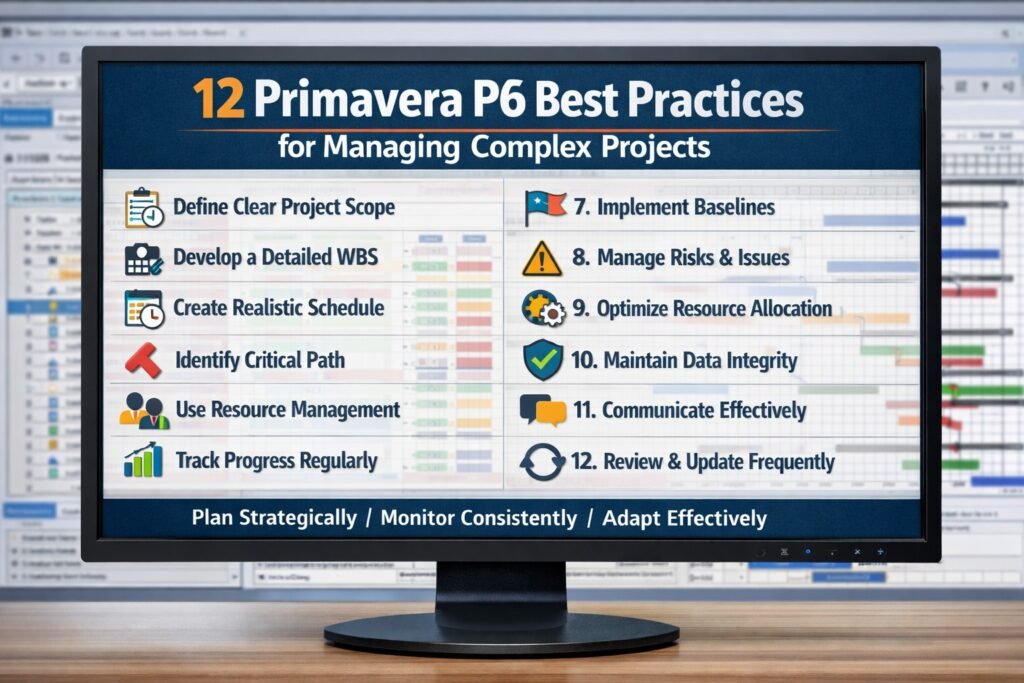
Managing complex projects in today’s competitive environment is no small feat. With numerous variables to consider and multiple stakeholders involved, utilizing a robust project management tool like Primavera P6 becomes essential. This article explores 12 Primavera P6 Best Practices for Managing Complex Projects . By implementing these strategies, organizations can ensure smoother project execution, optimal resource utilization, and enhanced communication.
Understanding Primavera P6 for Complex Project Management
Primavera P6 is a comprehensive project management software designed for large-scale and complex projects. It provides users with the tools to plan, manage, and execute projects efficiently. Understanding its capabilities is crucial for project managers who wish to leverage its full potential. The software is primarily built to aid in scheduling and resource management, offering a timeline that can handle thousands of activities simultaneously.
Familiarity with Primavera P6’s interface is the first step toward mastering it. The tool allows for detailed project breakdowns, enabling managers to visualize and manage various components of a project in a structured manner. It can handle everything from high-level overviews to task-level details, making it versatile for different project management needs. This adaptability ensures that managers can always focus on what matters most, regardless of the project’s complexity.
Finally, understanding Primavera P6 means recognizing its strengths in collaboration. The platform supports multiple users and offers permission settings that allow teams to work simultaneously while ensuring data integrity. This collaborative environment is vital for complex projects where coordination among various departments and stakeholders is essential. Embracing these aspects can lead to more effective management and a smoother project lifecycle.
Essential Skills for Effective Primavera P6 Navigation
Mastering Primavera P6 requires a specific set of skills that can enhance a project manager’s proficiency. First and foremost, a solid foundation in project management principles is essential. Managers should understand the fundamentals of scheduling, resource allocation, and budgeting. This foundational knowledge allows them to utilize P6’s features effectively, making informed decisions that lead to successful project outcomes.
Additionally, familiarity with data management is crucial. Primavera P6 is data-rich, meaning users need to be comfortable with analyzing and interpreting the information presented. Skills in data visualization can also enhance project tracking, enabling managers to extract insights from complex datasets and make them accessible to stakeholders. Effective data management skills help ensure that every decision made is backed by reliable information.
Lastly, communication skills play a pivotal role in navigating Primavera P6 successfully. The software is designed for collaboration among multiple teams, making it imperative for project managers to articulate their plans clearly and efficiently. Strong communication skills enable project managers to convey updates, address issues, and coordinate efforts across departments, ensuring everyone remains aligned with the project’s goals.
Setting Up Your Project for Success in Primavera P6
Proper project setup in Primavera P6 is vital for ensuring long-term success. Start by defining your project scope carefully. This involves breaking down the project into manageable components, also known as work breakdown structures (WBS). By establishing a clear WBS, project managers can visualize the entire scope, allocate resources effectively, and set realistic timelines.
Next, establishing a project baseline is crucial. A baseline serves as a reference point for measuring project performance and progress. By setting a baseline early in the project lifecycle, managers can identify deviations from the plan and implement corrective measures. It acts as a roadmap, guiding the team through the complexities of the project while maintaining focus on the original objectives.
Finally, ensure that all stakeholder roles and responsibilities are clearly defined and documented in Primavera P6. Clarity in roles helps prevent misunderstandings and overlaps in duties, enhancing team efficiency. Assigning tasks directly in the software also promotes accountability, ensuring that all team members know their contributions to the project’s success.
Key Features of Primavera P6 for Large Enterprises
Primavera P6 boasts several features designed specifically for large enterprises managing complex projects. One standout feature is its robust scheduling capabilities. The software allows for multi-project scheduling, enabling organizations to manage portfolios of projects rather than just individual ones. This holistic view is invaluable for resource allocation and prioritization across various projects.
Another powerful feature is its resource management module. Primavera P6 enables project managers to allocate resources effectively, track their utilization, and identify potential bottlenecks. This capability is essential for large organizations that must juggle multiple projects simultaneously while ensuring resources are not stretched too thin. The ability to see resource availability in real-time helps managers make informed decisions that can save time and costs.
Lastly, Primavera P6’s reporting and analytics capabilities are unparalleled. The software provides various customizable reports that can be generated for different stakeholders, from executives to project teams. These reports can display everything from performance metrics to forecasts, ensuring transparency across the organization. This feature fosters informed decision-making and keeps all stakeholders in the loop, which is critical for complex project management.
Customizing Views for Enhanced Project Oversight
Customizing views in Primavera P6 is an effective strategy for enhancing project oversight. The software allows users to modify layouts to display the most relevant information, which can be tailored to suit different team members’ needs. By creating custom dashboards, project managers can focus on key performance indicators (KPIs) that are essential for their specific roles, facilitating more effective monitoring and control.
Project managers can also create filters to narrow down the displayed information based on specific criteria, such as task status, deadlines, or resource allocations. This level of customization not only simplifies navigation through complex datasets but also allows users to hone in on areas that require immediate attention. For instance, filtering tasks that are running behind schedule can enable swift corrective actions, thus keeping the project on track.
Additionally, customizing views can significantly improve stakeholder communication. Tailored reports can be generated for different audiences, ensuring that each stakeholder receives the information relevant to their interests. This strategic approach to information dissemination fosters transparency and collaboration, ultimately leading to better project outcomes.
Utilizing Baselines to Track Project Performance
Establishing and utilizing baselines in Primavera P6 is essential for tracking project performance effectively. A baseline serves as a benchmark, allowing project managers to compare planned progress against actual performance. By setting a baseline at the project’s outset, managers can monitor deviations and take corrective actions when necessary, ensuring that the project remains aligned with its goals.
When deviations from the baseline occur, it’s crucial to analyze the underlying causes. Primavera P6 allows users to generate detailed reports that highlight these discrepancies. Understanding why a project is off track—be it due to resource shortages, unexpected delays, or scope changes—enables project managers to devise strategies to mitigate these issues and avoid repeating similar pitfalls in the future.
In addition to being a monitoring tool, baselines can also serve as a point of reflection for project teams. After project completion, analyzing the differences between actual performance and baseline can provide valuable insights for future projects. This continuous improvement approach fosters a culture of learning within organizations, ultimately enhancing their project management capabilities over time.
Strategies for Effective Resource Management in P6
Effective resource management is a cornerstone of successful project management, especially in complex projects. Primavera P6 provides several features that enable project managers to allocate and track resources efficiently. One key strategy is to regularly update resource availability in the system. By maintaining accurate information about resource availability, project managers can avoid over-allocation and ensure that team members are not overwhelmed with tasks.
Another effective strategy is to use the resource leveling feature within Primavera P6. This feature helps managers resolve resource conflicts by automatically adjusting the project schedule to balance workloads. It ensures that resources are utilized effectively, reducing burnout and maintaining team morale. By leveling resources, managers can also enhance project timelines and improve the quality of deliverables.
Additionally, performing regular resource audits can help organizations track the effectiveness of their resource allocation strategies. By evaluating the performance of individual team members and overall resource utilization, project managers can identify areas for improvement. This ongoing assessment fosters a proactive approach to resource management, allowing organizations to adapt to changing project needs and maximize productivity.
Leveraging Reports to Communicate Project Progress
Reports are a vital tool for communicating project progress to stakeholders, and Primavera P6 excels in this area. The software provides customizable reporting options that can be tailored to meet the needs of different stakeholders, from project teams to executive leadership. By leveraging these reports, project managers can provide insights into project performance, resource utilization, and budget adherence.
Regularly scheduled reports also aid in maintaining transparency among all stakeholders. Sharing reports at key project milestones helps ensure everyone is informed about progress and potential issues. This level of transparency fosters trust and collaboration within the team and among stakeholders, which is crucial for complex projects that involve multiple departments.
Moreover, leveraging visuals in reports can enhance understanding and engagement. Primavera P6 allows users to create charts and graphs that present data in a digestible format. Visual representations of project metrics can help stakeholders grasp complex information quickly, facilitating more informed discussions and decision-making. By effectively communicating progress through reports, organizations can ensure that all parties remain aligned and committed to the project’s success.
Managing complex projects is a challenging endeavor, but utilizing Primavera P6 effectively can make a significant difference. By following these 12 best practices, organizations can streamline project management processes, enhance collaboration, and improve overall project outcomes. With the right strategies in place, teams can navigate the complexities of project management with confidence, leading to successful and timely project deliveries.
Below is a corporate-focused FAQ section tailored for enterprise and large-scale project environments, aligned to Primavera P6 usage for complex project delivery.
Frequently Asked Questions (FAQ) – 12 Primavera P6 Best Practices for Managing Complex Projects
What is Primavera P6 used for in complex project management?
Primavera P6 is an enterprise-grade project management and scheduling tool designed for managing large, complex, and multi-year projects. It is widely used in industries such as construction, engineering, energy, utilities, and infrastructure where detailed scheduling, resource control, and governance are critical.
Why is Primavera P6 suitable for managing complex projects?
Primavera P6 can handle thousands of activities, multiple calendars, resource pools, and intricate dependencies within a single project or portfolio. Its ability to manage high levels of complexity makes it ideal for projects involving multiple stakeholders, contractors, and regulatory constraints.
What types of organizations benefit most from using Primavera P6?
Large enterprises, government agencies, and organizations managing capital-intensive or regulated projects benefit most from Primavera P6. It is particularly effective in environments that require strong governance, auditability, and detailed schedule control.
How does Primavera P6 support effective scheduling?
Primavera P6 uses advanced scheduling logic, including critical path analysis, constraints, baselines, and float calculations. These features allow project managers to model realistic schedules, assess impacts of change, and maintain control over delivery timelines.
What skills are required to use Primavera P6 effectively?
Effective use of Primavera P6 requires a strong understanding of project scheduling concepts, work breakdown structures (WBS), resource loading, and progress measurement. Analytical thinking and attention to detail are essential, as the tool relies heavily on accurate data inputs.
How does Primavera P6 handle resource management?
Primavera P6 enables detailed resource planning, allocation, leveling, and forecasting across projects. This helps organizations optimize resource utilization, identify capacity constraints, and make informed decisions about staffing and sequencing.
Can Primavera P6 support multi-user and collaborative project environments?
Yes. Primavera P6 is built for multi-user environments and supports role-based access, permissions, and concurrent updates. This ensures that planners, schedulers, project managers, and stakeholders can collaborate while maintaining data integrity and control.
How does Primavera P6 improve communication with stakeholders?
Primavera P6 provides standardized schedules, reports, and dashboards that improve transparency. Clear visibility into milestones, dependencies, and risks allows stakeholders to understand project status and make timely, informed decisions.
Is Primavera P6 suitable for portfolio and program management?
Primavera P6 supports portfolio-level visibility, enabling organizations to manage multiple projects simultaneously. This allows senior leaders and PMOs to assess priorities, risks, and resource demands across an entire program or investment portfolio.
What are common challenges when implementing Primavera P6?
Common challenges include a steep learning curve, inconsistent data quality, and lack of standardized scheduling practices. These issues can be mitigated through proper training, governance standards, and disciplined schedule management processes.
How does Primavera P6 support change control in complex projects?
Primavera P6 allows project teams to maintain baselines, track variances, and model schedule changes. This capability supports structured change control and helps organizations assess the impact of changes before approval.
Is Primavera P6 still relevant in modern project environments?
Yes. Despite the rise of lightweight PM tools, Primavera P6 remains a gold standard for complex, high-risk, and large-scale projects where precision, governance, and schedule integrity are non-negotiable.
Hashtags: #ProjectManagement #PrimaveraP6 #ResourceManagement #ComplexProjects #EnterpriseSolutions
Discover More great insights at http://www.pmresourcehub.com
Explore Free Project Management Templates https://pmresourcehub.com/library/
Explore What is Primavera P6? https://www.theknowledgeacademy.com/blog/primavera-p6