Trello vs Asana: Collaboration, Task, and Workflow Review
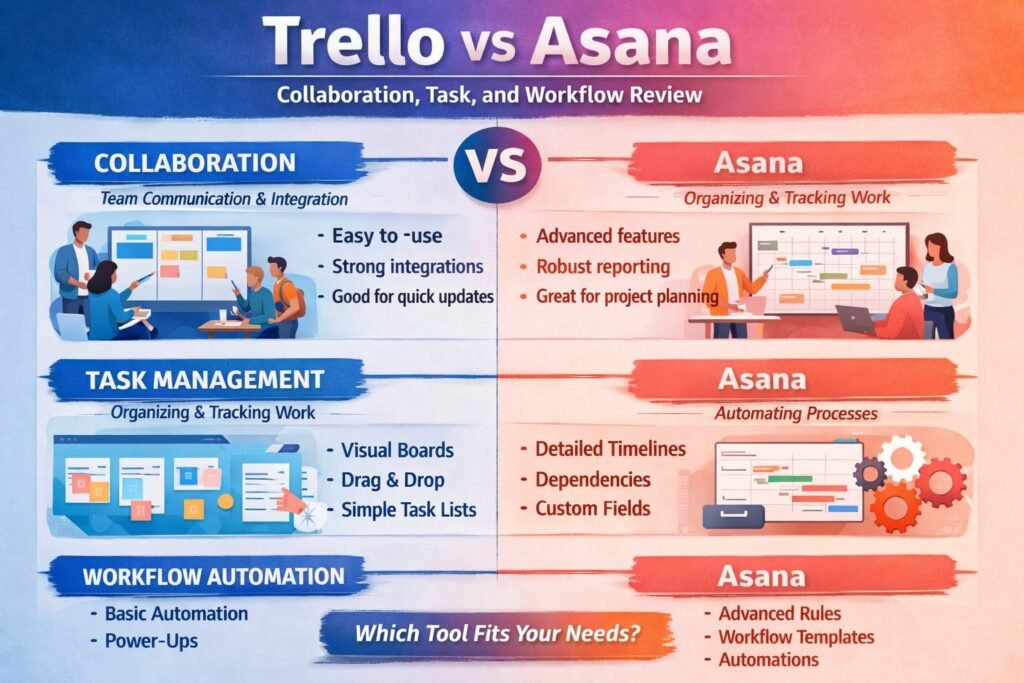
Trello and Asana are two of the most popular project management tools available today, often pitted against each other in discussions about which is more effective for team collaboration, task management, and workflow optimization. Both platforms offer a range of features designed to enhance productivity, streamline processes, and improve communication within organizations. In this article, we’ll dive deep into the strengths and weaknesses of Trello and Asana, examining key aspects of each tool to help you make an informed decision for your organization. Whether you’re a large enterprise or a small team, understanding these differences can significantly impact your project outcomes.
Trello vs Asana: An Overview of Project Management Tools
Trello, with its card-based layout and visually appealing interface, appeals to users who prefer a simplified, intuitive way to manage tasks. Trello operates on a board-and-card system, where tasks are represented as cards that can be moved across different stages of completion. This makes it particularly suited for teams focused on agile methodologies or those who thrive on visual task management. Its flexibility allows for customization, making it adaptable for various projects, from software development to marketing campaigns.
On the other hand, Asana delivers a more structured approach to project management, featuring lists, timelines, and calendars that enable teams to plan and execute projects systematically. Asana’s strength lies in its comprehensive features that support complex project management needs, including task dependencies, timelines, and progress tracking. It is designed for organizations that require a more formalized project management framework, making it a go-to for large teams and corporations.
While both tools Trello vs Asana aim to improve team collaboration and efficiency, they cater to different styles of work and project management approaches. Organizations must consider their project requirements and team dynamics when deciding which tool aligns best with their operational strategies.
Key Features of Trello: What Sets It Apart
One of Trello’s standout features is its simplicity. The drag-and-drop functionality allows users to easily move tasks between different stages, promoting a clear visualization of project progress. With customizable boards and lists, teams can tailor their Trello experience to fit specific workflows, allowing for a personalized approach to task management. Furthermore, Trello offers Power-Ups, which are integrations with third-party apps that enhance its capabilities, from integrating with Slack for communication to using calendar views for deadlines.
Another key aspect of Trello is its collaborative features. Team members can comment on cards, attach files, and set due dates, fostering an environment where communication flows seamlessly. The visual nature of Trello also makes it easy for users to quickly assess the status of tasks, which is particularly beneficial for remote teams that may not have regular face-to-face interactions.
Additionally, Trello’s mobile app ensures that users can stay connected and updated on tasks from anywhere, making it an excellent choice for teams with remote or mobile workforces. This accessibility enhances team productivity, as members can quickly adapt to changes and updates in real-time, regardless of their location.
Asana’s Unique Selling Points: A Closer Look
Asana shines through its robust task management capabilities, allowing for detailed task descriptions, subtasks, and the ability to assign tasks to multiple team members. This level of granularity facilitates better project tracking and accountability, especially in larger teams where multiple individuals are involved in a single project. Asana’s ability to create task dependencies ensures that teams are aware of the sequence of tasks and can plan accordingly, preventing bottlenecks and enhancing overall efficiency.
Another unique selling point for Asana is its advanced reporting features. The platform provides insights into project performance and team productivity through customizable reports and dashboards. This data-driven approach allows managers to make informed decisions based on actual performance metrics, which is critical for organizations that prioritize strategic planning and resource management.
Moreover, Asana promotes a structured approach to project management with its timeline and calendar views. These features allow teams to visualize project timelines effectively, facilitating better planning and coordination among team members. This structured workflow is particularly beneficial for larger organizations managing multiple projects simultaneously, ensuring that nothing slips through the cracks.
Collaboration Capabilities: Which Tool Excels?
When it comes to collaboration, both Trello and Asana offer features that enhance team communication but in different ways. Trello’s card system inherently fosters collaborative efforts through its comment sections and file attachments, allowing team members to provide feedback and share resources directly related to tasks. This direct line of communication can lead to rapid decision-making and a more fluid workflow, especially when teams are adopting an agile methodology.
Conversely, Asana’s collaboration features are more expansive, offering dedicated project conversations and the ability to tag team members in tasks or comments. This is particularly useful for organizations that require detailed discussions around specific tasks or projects. Asana also allows users to create public or private projects, offering control over who can view and participate in discussions. This feature can enhance collaboration across different departments or teams within larger organizations.
Additionally, Asana’s integration with communication tools like Slack and Microsoft Teams further amplifies its collaboration capabilities, allowing for seamless interactions without disrupting workflow. In contrast, Trello’s collaboration tools, while effective, may not provide the same level of depth and functionality that Asana does, especially for larger teams requiring complex discussions and interactions.
Task Management: Trello and Asana Compared
In task management, Trello’s strengths lie in its simplicity and visual representation of tasks. Each task is easily represented as a card, allowing teams to categorize and prioritize their work at a glance. The visual nature of Trello makes it an excellent choice for teams that prefer a straightforward approach to task management, where updates can be made with ease, and everyone can see the status of tasks in real-time.
Asana, on the other hand, excels in providing detailed task management functionalities. With the ability to create subtasks, set deadlines, and assign tasks to multiple individuals, Asana is ideal for complex projects that require a high level of detail and organization. The option to view tasks in a list, board, or calendar format allows teams to choose the layout that best fits their workflow, providing flexibility depending on the project’s needs.
Moreover, Asana’s task dependencies feature sets it apart, allowing teams to understand the sequence in which tasks need to be completed. This prevents delays and ensures that everyone is on the same page regarding project timelines. For organizations with intricate project requirements, Asana’s comprehensive task management tools may provide the clarity and structure needed to keep projects on track.
Workflow Automation: The Power of Each Platform
Workflow automation is an essential feature for organizations looking to improve efficiency and reduce repetitive tasks. Trello allows for automation through its Butler feature, enabling users to set up rules that automate actions based on specific triggers. For example, when a task is moved to a “Done” column, Butler can automatically archive it. This capability helps streamline workflows, especially for teams that handle numerous tasks daily, freeing up time for more strategic work.
Asana also offers powerful automation capabilities through its “Rules” feature, which allows users to automate workflows across projects. Users can create rules that assign tasks, change due dates, or notify team members based on certain actions. This feature is particularly useful for large teams managing multiple projects, as it can help reduce the manual effort required to keep everything organized and ensure that tasks are moving forward on schedule.
Both platforms emphasize the importance of automation in enhancing productivity, but Asana’s capabilities tend to offer more complexity and customization, making it a better fit for larger organizations that require intricate workflows. Ultimately, the choice between Trello and Asana will depend on the specific automation needs and project requirements of your organization.
User Experience: Interface and Accessibility Reviewed
User experience is a crucial factor in determining the effectiveness of any project management tool. Trello is often praised for its clean, intuitive interface that is easy to navigate. The visual layout makes it simple for users to understand their tasks and how they fit into the larger project without feeling overwhelmed. This user-friendly design is particularly beneficial for teams that may not have extensive experience with project management software, allowing for a quick onboarding process.
In contrast, Asana offers a more structured interface that may initially seem complex to new users. However, its organized layout is designed to provide comprehensive access to features that support detailed task management and reporting. Asana’s various viewing options, such as list, board, and calendar, enhance its usability, catering to different preferences among team members. While it may take a bit longer for new users to acclimate, the depth of features available ultimately supports a more robust project management approach.
Both tools Trello vs Asana are accessible across devices, with mobile applications that ensure teams can manage their work on the go. This accessibility is invaluable for organizations with remote teams or those needing to stay connected across various locations. Ultimately, both Trello and Asana boast strong user experience attributes, but the best choice will depend on your team’s familiarity with project management tools and preferences for visual versus structured interfaces.
Making the Right Choice for Your Organization
Choosing between Trello and Asana ultimately comes down to understanding the specific needs of your organization and how each tool aligns with those needs. If your team thrives on visual management and requires a straightforward, agile approach to tasks, Trello may be the better option. Its simplicity and adaptability make it an attractive choice for smaller teams or those working in creative fields where flexibility is key.
Conversely, if your organization is larger and manages complex projects requiring detailed task management, Asana may provide the structure and functionality needed to ensure success. With its advanced reporting features and comprehensive task management tools, Asana supports data-driven decision-making that aligns with strategic organizational goals.
Ultimately, it’s essential to evaluate your team’s workflow, project complexity, and communication preferences when making this decision. Both Trello and Asana have their merits, and understanding your unique requirements will guide you toward the best solution for enhancing collaboration, task management, and workflow efficiency within your organization.
In conclusion, both Trello vs Asana offer powerful project management solutions that cater to different organizational needs and preferences. By carefully assessing the features, capabilities, and user experiences of each platform, you can make a well-informed decision that aligns with your team’s workflow and project management strategies. Ultimately, the right choice will enable your organization to enhance collaboration, streamline task management, and achieve project success
Hashtags: #Trello #Asana #ProjectManagement #Collaboration #Workflow #Trello vs Asana
External Source: For more insights on project management software tools, visit tech.co
Discover More great templates at
https://pmresourcehub.com/library/pm-assignment-letter-template-free-word-download/
https://pmresourcehub.com/library/project-repository-setup-record-template-free-word-download/