
Project Charter – Free Download Word
Introduction to the Project Charter
The Project Charter is widely considered the most critical document in the project management lifecycle. It acts as the “birth certificate” of the project. Until this document is signed, the project does not formally exist within the organization. While the Business Case (Template 1) explains why an investment should be made, the Project Charter authorizes the how, the who, and the when.
Its primary legal and functional purpose is to authorize the Project Manager to apply organizational resources to project activities. Without a Charter, a Project Manager is essentially a captain without a ship or a mandate. They cannot validly ask for staff time, spend budget, or schedule meetings with authority.
This template is designed to capture the high-level agreements between the Project Sponsor and the Project Manager. It is not a detailed project plan. It does not contain a detailed Gantt chart or a line-by-line budget. Instead, it defines the boundaries of the sandbox in which the project team will play. It sets the expectations for success and defines the constraints.
When completing this template, remember that brevity in the final output is often preferred by executives, but the thinking behind it must be deep. This guide provides extensive instructions to ensure that every sentence in your Charter carries weight and clarity.
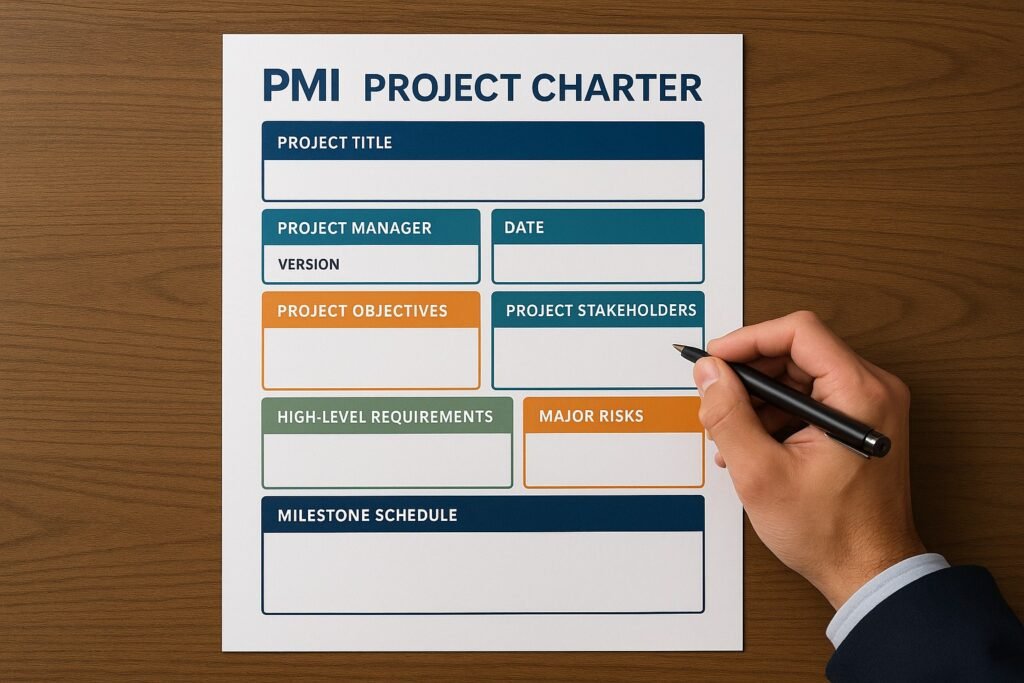
Section 1: General Project Information
Guidance for Completion
This section provides the basic metadata required to track the project within the organization’s portfolio system. It ensures that the project is uniquely identifiable and that the hierarchy of ownership is clear from the very first page.
Fields to Include
- Project Name: Choose a name that is descriptive and easy to remember. Avoid generic names like “CRM Upgrade” if you have multiple CRM systems. Instead, use “Global Salesforce Migration 2024.”
- Project ID: If your PMO assigns specific codes (e.g., IT-2024-005), record it here.
- Project Sponsor: The name of the executive who is funding the project.
- Project Manager: The name of the person authorized to lead the work.
- Date of Charter: The date the document is submitted for signature.
Tip for Success
Be careful with the “Project Manager” field. If the Project Manager changes later, this document does not necessarily need to be re-signed, but an amendment or an official “Change of Authority” email should be appended to it. However, if the Sponsor changes, it is often wise to re-sign the Charter to ensure the new Sponsor agrees with the original mandate.
Section 2: Project Purpose and Justification
Guidance for Completion
This section links the project back to the Business Case. You should summarize the business need and the strategic reason for undertaking the project. This is the “Elevator Pitch” for the project. If a stakeholder asks, “Why are we spending $500,000 on this?” the answer lies in this paragraph.
Drafting Instructions
Do not copy and paste the entire Business Case. Summarize it into two distinct paragraphs:
- The Business Need: Describe the problem or opportunity.
- The Strategic Fit: Describe how this aligns with organizational goals.
Draft Example
“Business Need: currently, our accounts payable process is 80% manual, resulting in an average processing time of 15 days per invoice and late fees totaling $45,000 annually.
Project Justification: This project will automate the ingestion of invoices. This directly supports the ‘Operational Excellence’ pillar of the 2025 Corporate Strategy by reducing cycle times to under 3 days and eliminating late fees. Furthermore, it creates a digital audit trail which is required for our upcoming ISO certification.”
Section 3: Project Objectives (Success Criteria)
Guidance for Completion
Objectives are the specific, measurable outcomes that the project must deliver to be considered a success. A common failure in project management is defining objectives that are vague. Vague objectives lead to arguments at the end of the project regarding whether the work is actually finished.
You must use the SMART framework for this section.
- Specific: Targeted and unambiguous.
- Measurable: Quantifiable (numbers, percentages, binary yes/no).
- Achievable: Realistic given the resources.
- Relevant: Aligned with the business goal.
- Time-bound: Has a deadline.
Defining Success vs. Deliverables
Do not confuse “deliverables” (what you build) with “objectives” (what you achieve).
- Bad Objective: “Build a new website.” (This is a deliverable).
- Good Objective: “Launch a new website that loads in under 2 seconds and increases conversion rates by 15% by Q3.”
Draft Example
- Financial Objective: Reduce the cost per transaction from $4.50 to $2.00 by December 31st.
- Performance Objective: System must support 5,000 concurrent users with zero latency.
- Adoption Objective: Achieve 90% staff adoption of the new tool within 30 days of Go-Live.
Section 4: High-Level Scope Definition
Guidance for Completion
Scope definition is about drawing a circle around the project. Everything inside the circle is your responsibility; everything outside is not. In the Charter, this is “High-Level” scope. You will define the detailed scope later in the Project Scope Statement.
This section is vital for preventing “Scope Creep” (the unauthorized expansion of the project). You must explicitly define both what is In Scope and what is Out of Scope.
In Scope (The Inclusions)
List the major components, processes, or sites that will be addressed.
- “Migration of 5,000 user accounts.”
- “Training for the London and New York offices.”
- “Purchase and installation of 50 new servers.”
Out of Scope (The Exclusions)
This is arguably more important than the inclusions. If you do not explicitly exclude something, stakeholders will often assume it is included. Be ruthless here.
- “Training for the Singapore office is out of scope.”
- “Decommissioning of the old hardware is out of scope; this will be handled by the Facilities team.”
- “Mobile app development is out of scope for Phase 1.”
Tip for Success
Use the phrase “Explicitly Excluded” to avoid ambiguity. If a stakeholder reads “Out of Scope,” they might think “Maybe later.” If they read “Explicitly Excluded,” they understand it is a hard boundary.
Section 5: High-Level Requirements
Guidance for Completion
At the Charter stage, you do not have a detailed requirements document. However, you do know the “Big Rocks” or the “Must-Haves” that the solution must possess. These are usually the deal-breakers. If these requirements are not met, the project is a failure.
Categories to Consider
- Functional Requirements: What the product must do (e.g., “Must process credit card payments”).
- Non-Functional Requirements: How the product must perform (e.g., “Must be available 99.9% of the time,” or “Must be compliant with GDPR”).
Draft Example
- Security: The system must require Two-Factor Authentication (2FA) for all administrative logins.
- Integration: The system must have a bi-directional API sync with the existing HR database.
- Reporting: The system must generate automated PDF reports for the Board of Directors on the first of every month.
Section 6: Key Assumptions and Constraints
Guidance for Completion
Every project is planned based on certain beliefs about the future (Assumptions) and certain limitations (Constraints). Listing these protects the Project Manager. If an assumption proves to be false, the project plan will need to change, and this document serves as proof that the original plan was based on different data.
Assumptions (Things we believe to be true)
- “We assume that the vendor will release the API documentation by January 1st.”
- “We assume that the Key Subject Matter Experts (SMEs) will be available for 10 hours per week during the testing phase.”
- “We assume the currency exchange rate will remain stable within a 5% variance.”
Constraints (Limits we must work within)
- Hard Deadlines: “The project must be live before the Black Friday sales period starts.”
- Budget Caps: “The total budget cannot exceed $150,000 under any circumstances due to CAPEX limits.”
- Technology Standards: “The solution must be hosted on Microsoft Azure, not AWS, per company policy.”
Section 7: High-Level Risks
Guidance for Completion
You do not need a full Risk Register here (that comes later). You need to highlight the “Strategic Risks” that could derail the entire initiative. These are the risks that the Sponsor needs to be aware of before they sign the check.
Formatting the Risks
State the risk event and the potential impact.
- Risk: “The regulatory framework for AI is currently under review by the government.”
- Impact: “New laws could be passed mid-project that render our design non-compliant, requiring expensive rework.”
- Risk: “We are relying on a single external vendor for the core code.”
- Impact: “If the vendor goes bankrupt or loses key staff, the project could stall indefinitely.”
Section 8: Summary Milestone Schedule
Guidance for Completion
Executives think in terms of quarters and major deliverables, not weekly tasks. Provide a high-level timeline that outlines the major “Phase Gates” or key drops. Do not commit to specific dates (e.g., “October 12th”) unless they are hard constraints. Instead, use ranges or months (e.g., “October 2024”).
Key Milestones to Include
- Charter Approval: (Today)
- Requirements Sign-off: (End of Planning)
- Design Complete: (Before Build starts)
- UAT (User Acceptance Testing) Start: (Validation)
- Go-Live: (Release)
- Project Closure: (Handover)
Draft Example
- Project Kick-off: January 2024
- Vendor Selection Complete: March 2024
- Prototype Review: May 2024
- Pilot Launch: August 2024
- Full Rollout: October 2024
Section 9: Estimated Budget
Guidance for Completion
This is an “Order of Magnitude” estimate. It is not the final budget. Usually, at the Charter stage, the budget accuracy is between -25% and +75%. You are asking for a “bucket” of money to get started.
You should break this down into high-level categories so the Sponsor sees where the money is going.
Cost Categories
- Internal Labor: (If your company cross-charges for time).
- External Labor/Consultants: (Contractors, Agencies).
- Hardware/Software: (Licenses, Servers).
- Travel/Training: (Workshops, Site visits).
- Contingency Reserve: (Funds set aside for risks).
Draft Example
- Software Licenses: $50,000
- Implementation Partner Fees: $75,000
- Internal Staff Backfill: $20,000
- Contingency (15%): $21,750
- Total Authorization Request: $166,750
Section 10: Key Stakeholders
Guidance for Completion
Who are the main players? You do not need to list every single end-user. List the people who have decision-making power or significant influence over the project direction.
Roles to Identify
- Sponsor: (Already listed, but good to reiterate if there are co-sponsors).
- Steering Committee: The group of senior leaders providing oversight.
- Key Customers: The heads of the departments receiving the benefit.
- Key Suppliers: The primary vendors.
Draft Example
- Project Sponsor: Sarah Jenkins (VP of Marketing)
- Technical Lead: Mike Ross (IT Director)
- Business Lead: Rachel Green (Head of Sales)
- Procurement Rep: David Lee (Sr. Buyer)
Section 11: Project Manager Authority Levels
Guidance for Completion
This is often the most overlooked section, yet it is the most vital for the Project Manager’s sanity. This section defines what the PM is allowed to do without asking for permission. Explicitly stating this prevents the PM from having to nag the Sponsor for every minor decision.
Categories of Authority to Define
- Staffing Authority: Can the PM select their own team members? Can they remove underperforming team members?
- Example: “The PM has the authority to request resources from functional managers and negotiate availability. The PM may remove team members for non-performance after one formal warning.”
- Budget Authority: What is the variance limit?
- Example: “The PM is authorized to approve individual invoices up to $5,000. The PM is authorized to manage the budget within a +/- 10% variance of the total baseline. Deviations larger than 10% require Sponsor approval.”
- Technical Authority: Can the PM make technical trade-offs?
- Example: “The PM acts as the final decision-maker on technical disputes at the working level, provided the decision does not alter the core scope.”
- Conflict Resolution:
- Example: “The PM is authorized to resolve conflicts between functional departments regarding project priorities.”
Why This Matters
If you do not define this, you are a coordinator, not a manager. A manager has authority. A coordinator just takes notes. Use the Charter to establish yourself as a manager.
Section 12: Project Charter Sign-Off
Guidance for Completion
A Charter is worthless without a signature. The signature signifies the formal transfer of authority and funds. It is a contract between the Sponsor (who wants the result) and the Manager (who will deliver it).
Signature Block
Include space for the Printed Name, Signature, and Date.
- Approved By (Project Sponsor):
- Name: __________________________
- Signature: _______________________
- Date: ___________________________
- Accepted By (Project Manager):
- Name: __________________________
- Signature: _______________________
- Date: ___________________________
Tips for the Signing Meeting
Do not just email this document and ask for a signature. Schedule a “Charter Review” meeting. Walk the Sponsor through the risks and the constraints. Ensure they truly understand what they are signing. When they sign, say: “Thank you. This signature formally launches the project. I will now begin the detailed planning phase.”
Conclusion
The Project Charter is the foundation upon which the entire project structure is built. A weak charter leads to a shaky project. If the objectives are unclear, the scope is undefined, or the authority is ambiguous, the project will suffer from “drift” later in the lifecycle.
By completing this template with diligence and detail, you are doing more than just filling out paperwork; you are negotiating the terms of your engagement. You are clarifying what “Success” looks like so that six months from now, there is no debate about whether the project delivered value.
Remember that the Charter is a “living” document only in the sense that it serves as a baseline. It is generally not changed once signed. If the project changes drastically (e.g., the budget doubles or the scope shifts entirely), you should not just edit the Charter; you should likely close the current project and charter a new one, or create a formal “Charter Addendum.” This preserves the integrity of the original agreement.
Use this document to align your stakeholders. When scope creep begins to happen (and it will), you can gently point back to Section 4 of this document and say, “I agree that is a great idea, but as per our signed Charter, that feature is explicitly out of scope. We can add it, but we will need to adjust the budget and timeline. Shall I prepare a Change Request?” This shifts the conversation from opinion to governance.
Meta Description
A comprehensive Project Charter template providing step-by-step guidance on defining project scope, objectives, authority levels, and success criteria for formal authorization.
Discover More great insights at www.pmresourcehub.com
Explore our Project Management Blog Category